Chapter 13 · Part 2
SMS Templates
Save the messages you send often as templates, then reuse them in one click when composing or scheduling. Each template stores a name, message type, and an optional preset brand name.
Creating a template
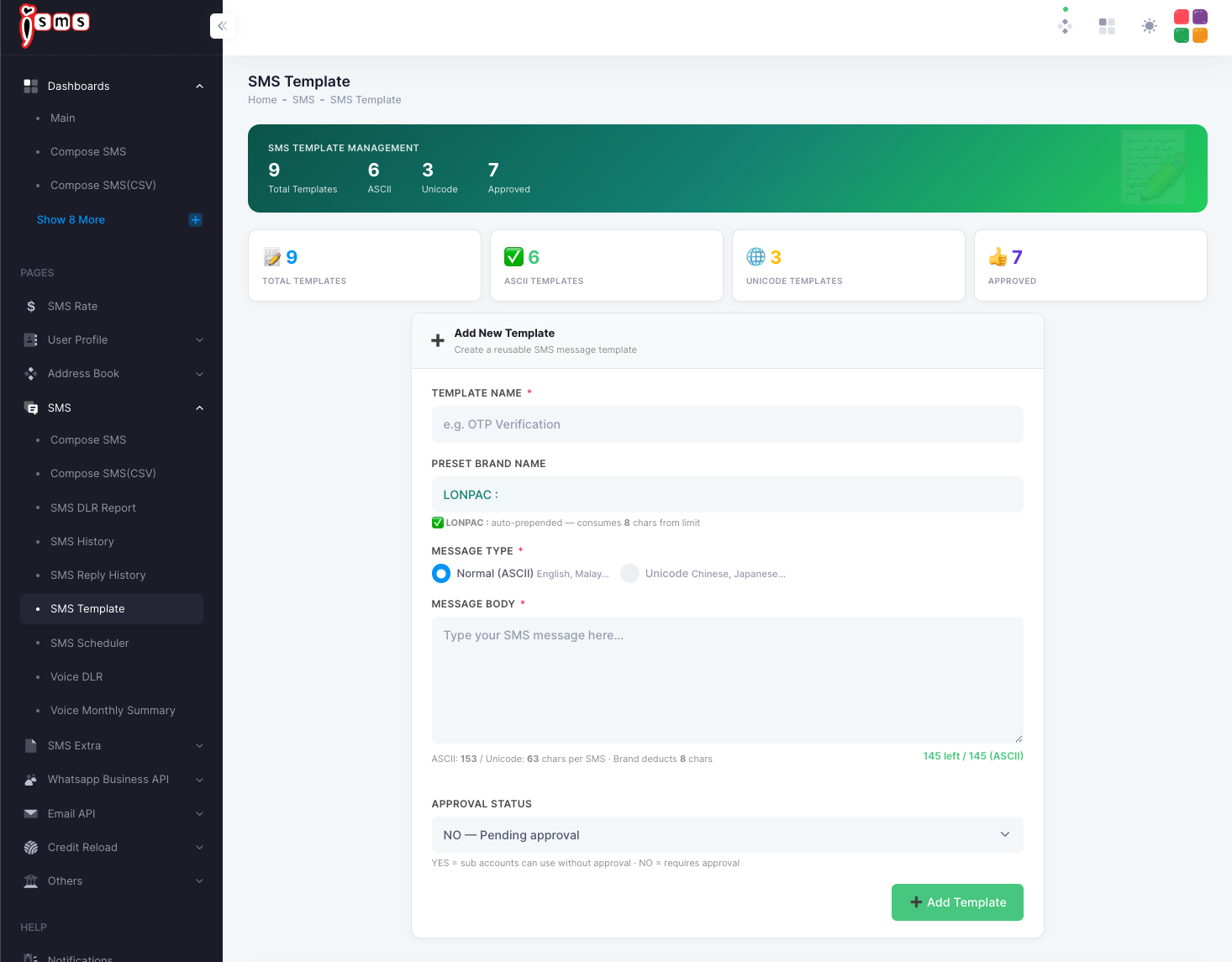
From the left menu, go to SMS → SMS Template. The Template Management screen shows your totals (total, ASCII, Unicode, and approved) and a form to add a new one.
- 1
Name the template
Enter a Template Name that's easy to recognise later, e.g. OTP Verification.
- 2
Set the preset brand (optional)
A Preset Brand Name is automatically added to the start of the message. Note it consumes 8 characters of your per-SMS limit.
- 3
Choose the message type
Pick Normal (ASCII) for English/Malay, or Unicode for Chinese, Japanese, and other scripts.
- 4
Write the message body
Type your message. The counter shows how many characters remain (after the brand name is deducted).
- 5
Set the approval status
NO = the template requires approval before sub-accounts can use it. YES = sub-accounts can use it straight away.
- 6
Add the template
Click Add Template. Saved templates then appear in the Template dropdown when you compose or schedule an SMS.
Character limits
| Message type | Characters per SMS |
|---|---|
| Normal (ASCII — English, BM) | 153 |
| Unicode (Chinese, Japanese, emoji) | 63 |