Chapter 04 · Part 1
Compose Bulk SMS
The Compose SMS page is where you type a message, paste your recipient numbers, and send — now or scheduled for later. This walkthrough covers every option, including sender ID, reply settings, message types, and how characters turn into SMS credits.
Sending a bulk SMS
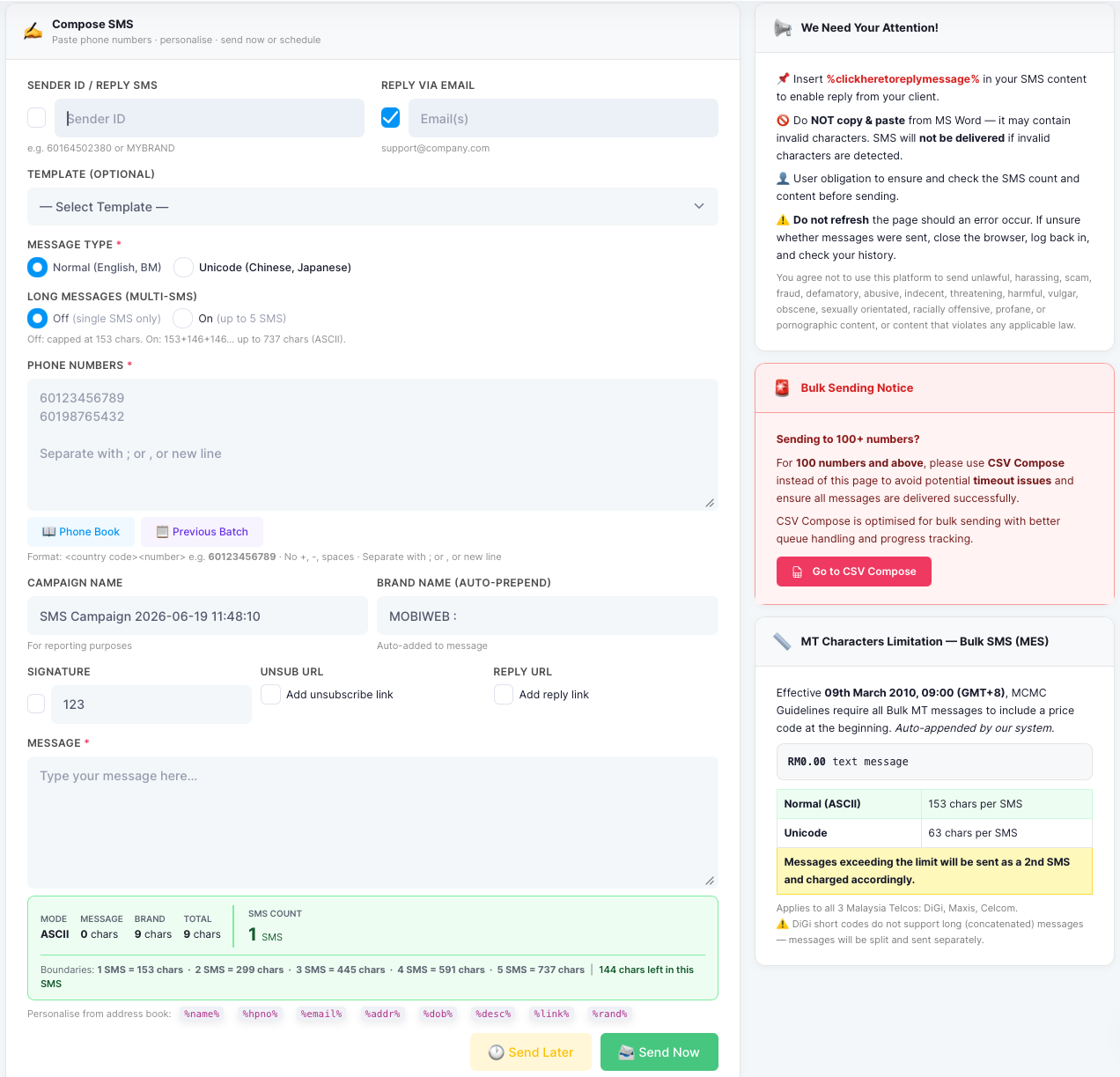
From the left menu, open SMS → Compose SMS, then work through the form. For sending to 100 numbers or more, use CSV Compose instead — it’s built for large batches.
- 1
Set your Sender ID
In Sender ID / Reply SMS, enter the name or number recipients will see — a registered Sender ID such as MYBRAND, or a mobile number like 60164502380.
- 2
Choose how replies come back
Tick Reply via Email and enter an address to have customer replies forwarded to your inbox. To let customers reply by SMS, insert the
%clickheretoreplymessage%token in your message. - 3
(Optional) Pick a template
Choose a saved message from the Template dropdown to auto-fill the message box.
- 4
Choose the message type
Select Normal (English, BM) or Unicode (Chinese, Japanese). This changes how many characters fit in one SMS — see the limits below.
- 5
Turn Long Messages on or off
Off sends a single SMS (capped at 153 characters). On joins up to 5 SMS into one long message (up to 737 ASCII characters).
- 6
Enter the phone numbers
Type recipient numbers in the Phone Numbers box — one per line, or separated by
;or,. Use country code + number, e.g.60123456789, with no+, dashes, or spaces. You can also load contacts from Phone Book or reuse a Previous Batch. - 7
Name your campaign
The Campaign Name is for your own reporting. A Brand Name is automatically added to the start of every message.
- 8
Write your message
Type your text in the Message box. The live counter shows the mode, character count, and how many SMS credits the message will use. You can also add a Signature, an unsubscribe link, or a reply link.
- 9
Send now or later
Click Send Now to send immediately, or Send Later to schedule for a future date and time.
How characters become SMS credits
One SMS holds 153 ASCII characters. Longer messages are split and joined into a multi-SMS message — and charged per part, up to 5 SMS.
ASCII message length → SMS credits
Characters used (cumulative). The first SMS holds 153 characters; each additional joined SMS adds 146, up to 737 characters across 5 SMS.
| Message type | Characters per SMS |
|---|---|
| Normal (ASCII — English, BM) | 153 |
| Unicode (Chinese, Japanese, emoji) | 63 |
Messages over the limit are sent as additional SMS and charged accordingly.
Personalise your message
Insert any of these tokens and iSMS replaces them with each contact’s details from your address book:
RM0.00) is also auto-added to the start of every bulk SMS.