Main
🏠 Home ℹ️ About Us
WhatsApp
💬 WhatsApp Business API (WABA) 🔐 OTP & TAC via WhatsApp 🤖 WhatsApp + AI Chatbot 🔵 Blue Tick Verification 🤖 AI Chatbot & Auto-Response 🎨 Automation Flow Builder 🔘 Interactive Messages 💡 Automation Use Cases 📱 Business App Coexistence
SMS
📱 One-Way Bulk SMS 🔒 Two-Factor Authentication (2FA) 🌏 Global SMS Coverage ⚡ SMS API
Email & API
✉️ Email Service Overview 🔌 Email SMTP API 🛠 REST API Reference
Queue System
🏢 Queue System Overview 💬 WhatsApp QMS ☁️ Cloud QMS ⚡ Cloud + WhatsApp QMS 📖 Cloud & WhatsApp QMS Guide 🎯 Request Free Demo
Pricing
💰 Full SGD Rate List 🛒 Buy SMS Credits
Support
📩 Contact Us ❓ FAQ 📖 End-User Guide ⚠️ Service Advisory
🔑 Login 📝 Register Free

Chapter 10 · Part 1

How to Create a CSV File in OpenOffice

Using OpenOffice Calc? You can open, format, and save a clean CSV that iSMS will accept. The important parts are the number format and choosing the right delimiters when you save.

Creating your CSV in OpenOffice Calc

  1. 1

    Open in Calc with the comma separator

    Open your .csv in OpenOffice Calc, and on the import screen choose Separated by → Comma.

    OpenOffice Calc text import with Comma selected as separator.
  2. 2

    Format the cells as General

    Highlight all the data, right-click and choose Format Cells, then set Category → Number and Format → General.

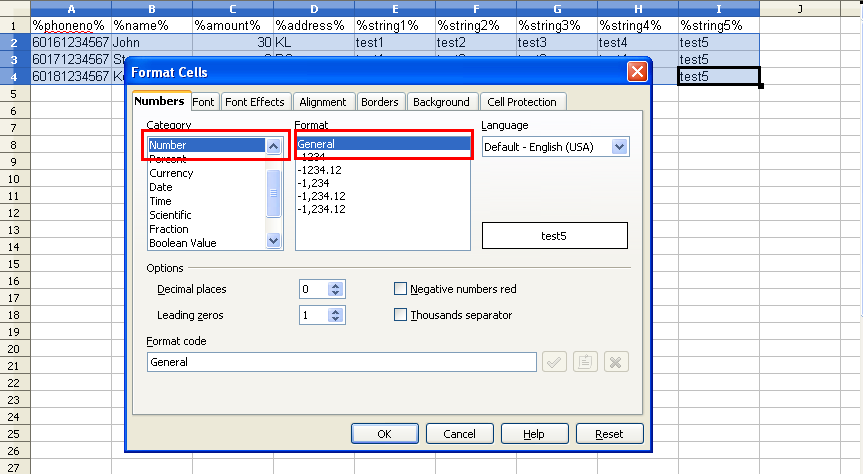
    Format Cells selected in OpenOffice Calc. Number category with General format selected.
  3. 3

    Save as Text CSV

    Go to File → Save As and set Save as type → Text CSV (.csv).
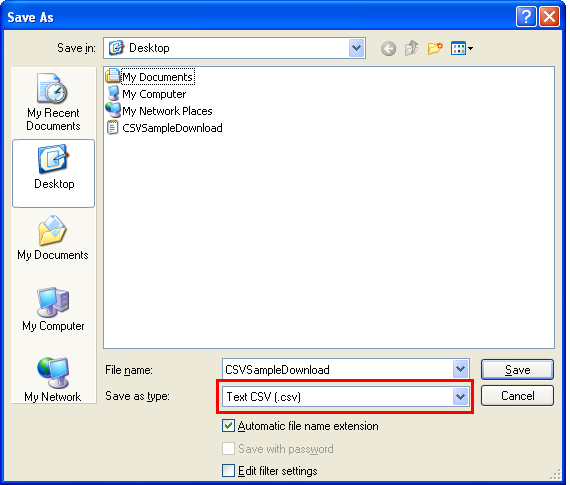
    Save As dialog with Text CSV file type selected.
  4. 4

    Keep the current format

    When OpenOffice asks, click Keep Current Format to save as CSV rather than the OpenOffice format.
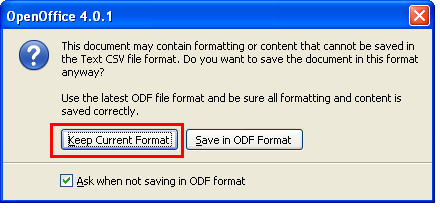
    Prompt to keep the current (CSV) format.
  5. 5

    Set the delimiters and save

    Choose a comma (,) as the Field delimiter and a quotation mark (") as the Text delimiter, then click OK to save the CSV file.
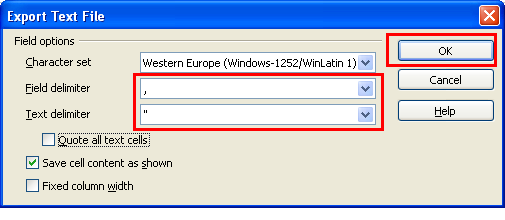
    Export dialog with comma field delimiter and quote text delimiter.

The two delimiters to set

,
Field delimiterseparates each column
"
Text delimiterwraps text values

In the export dialog, set the field delimiter to a comma and the text delimiter to a quotation mark so iSMS reads the columns correctly.

Your CSV is ready — head to CSV Compose to upload and send.

Need help?
Our team is happy to assist with anything in this guide. Contact us →
💬