📖 Bulk SMS End User Guide
Address Book — Manage Groups
Address Book — Manage Groups
Go to the Address Book menu tab in your iSMS member page. Select "Manage Group".
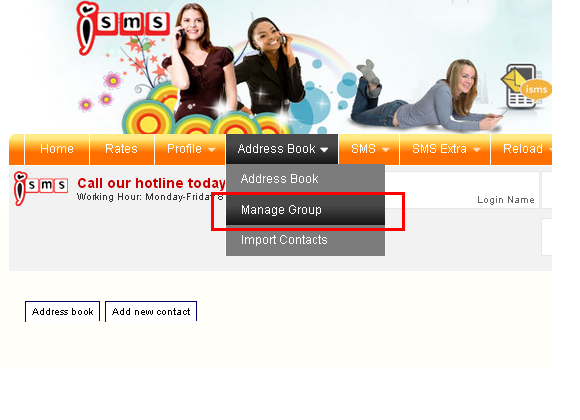
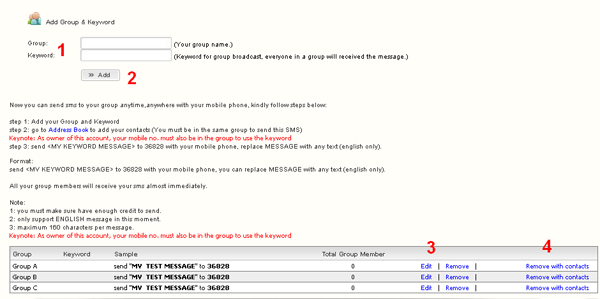
- Group Information — enter a group name and optional description
- Click "Add" to save the new group
- Edit / Remove — edit the group name or delete the group only
⚠️ Note: Only the group is deleted — the contacts themselves remain in your address book. - Remove with Contacts — permanently deletes the group and all contacts inside it
💡 Tip: Create separate groups for different campaign types — e.g. "VIP Customers", "Staff", "Promotions". You can send SMS to a group directly from the Compose SMS page by selecting the group name.
Next: Address Book — Import Contacts →
📞 Need Help?
Email: sales@mobiweb.com.my (include your username) |
Toll Free: +6016 450 2380 |
KL: +6016 450 2380

FREE Download (PDF)
Guide Details
Download: Free
Version: 1.2
Size: 2.65 MB
Language: English
Requires: PDF Viewer
© 2026 Bulk SMS Singapore · Powered by iSMS Malaysia · MobiWeb Sdn Bhd
Version: 1.2
Size: 2.65 MB
Language: English
Requires: PDF Viewer
© 2026 Bulk SMS Singapore · Powered by iSMS Malaysia · MobiWeb Sdn Bhd