📖 Bulk SMS End User Guide
Address Book — Import Contacts
Address Book — Import Contacts
1
Go to the Address Book tab in your iSMS member page. Select "Import Contact".
2
Click "Choose Files" to select your prepared CSV file.
3
Click "CSV Sample" to download the correct CSV format template if you haven't prepared your file yet.
4
Select a Group from the dropdown to assign imported contacts to a group (optional but recommended).
5
Click "Submit" to upload and import the contacts.

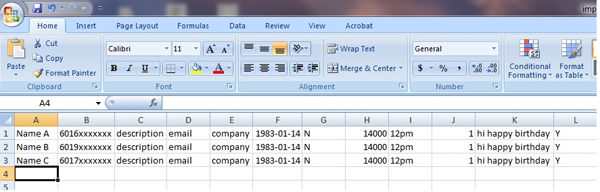
CSV File Format
Columns marked * are required. All others are optional.
| Column | Field | Notes |
|---|---|---|
| A * | Name | Contact name — use phone number if no name is available |
| B * | Phone Number | Full number with country code e.g. 60123456789 |
| C | Description | Optional notes about the contact |
| D | Email Address | Contact email |
| E | Company Name | Contact company |
| F | Date of Birth | Format: YYYY-MM-DD |
| G | Birthday Reminder | Y = Enable, N = Disable |
| H | Group | Must match an existing group name in your account |
| I | Birthday Greeting Time | e.g. 12am or 12pm |
| J | Message Type | Enter 1 |
| K | Greeting Message | English / Malay only |
| L | Enable Greeting | Y = Enable, N = Disable |
💡 Tip: Download the CSV Sample from within the Import Contact page to get a correctly formatted template — just fill in your data and upload.
📞 Need Help?
Email: sales@mobiweb.com.my (include your username) |
Toll Free: +6016 450 2380 |
KL: +6016 450 2380

FREE Download (PDF)
Guide Details
Download: Free
Version: 1.2
Size: 2.65 MB
Language: English
Requires: PDF Viewer
© 2026 Bulk SMS Singapore · Powered by iSMS Malaysia · MobiWeb Sdn Bhd
Version: 1.2
Size: 2.65 MB
Language: English
Requires: PDF Viewer
© 2026 Bulk SMS Singapore · Powered by iSMS Malaysia · MobiWeb Sdn Bhd