Sub Account SMS Usage Report
Monitor SMS credit usage across all your sub-accounts as the main administrator.
Sub Account Report Overview
If you manage multiple sub-accounts under your main iSMS account, the Sub Account Report lets you monitor SMS usage for each sub-account — including credits used, message counts, and activity dates.
How to Access Sub Account Report
Log in to your iSMS member account. As the main administrator, navigate to Reports → Sub Account Report. You will see a usage breakdown per sub-account.
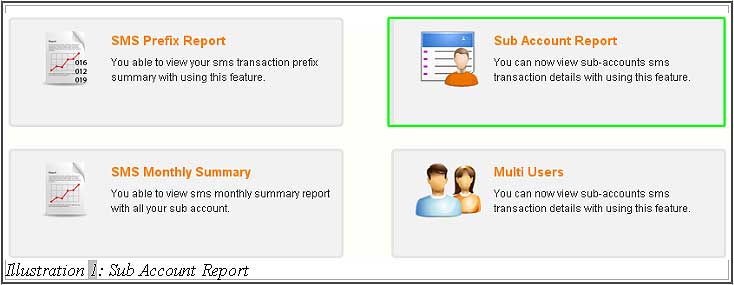
Reading the Report
The report shows a day-by-day breakdown of SMS credits used by each sub-account within a selected month. As the administrator, you can see which sub-accounts are active, how many credits each has consumed, and compare usage across the team.
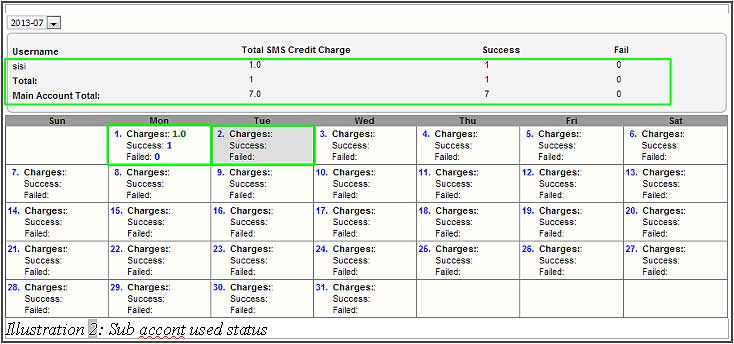
For example, a sub-account named "marketing" that used 50 credits on the 3rd of the month will be visible in the report with the date and credit amount clearly shown.
Learn more: How to Create Sub Accounts →
📞 Contact iSMS Support
Email: sales@mobiweb.com.my (include your username) | WhatsApp: +603 2780 3801 | KL: +603 2780 3880 | Penang: +604 2024 033